
Hardware Specifications
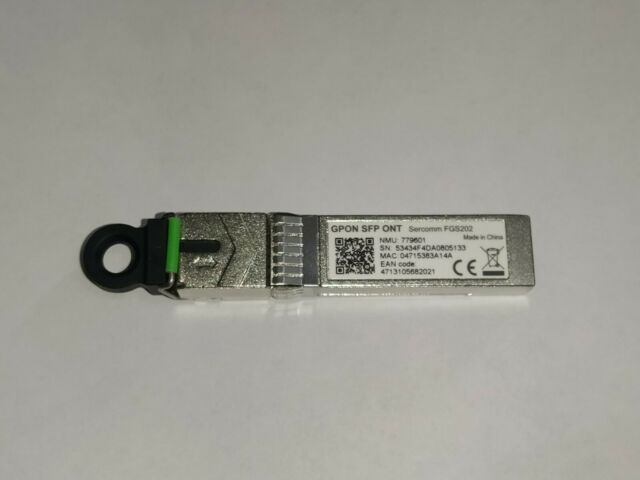
| Vendor/Brand | Sercomm |
| Model | FGS202 |
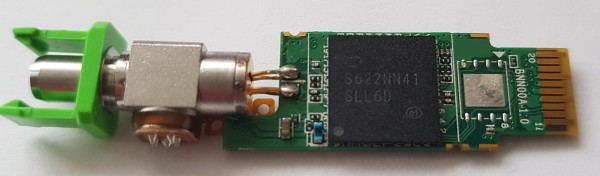
| Chipset | Lantiq PEB98036 |
| Flash | 8 MiB (MXIC MX25L6405D) |
| RAM | 1 MiB |
| System | eCos |
| HSGMII | Yes |
| Optics | SC/APC |
| IP address | 192.168.2.200/24 |
| Web Gui | No |
| SSH | No |
| Telnet | ✅ user admin, password admin |
| Serial | ✅ on SFP, only TX |
| Serial baud | 115200 |
| Serial encoding | 8-N-1 |
| Form Factor | miniONT SFP |
Serial
The stick has a TTL 3.3v UART console (configured as 115200 8-N-1) that can be accessed from the SFP connector.
| USB TTL(UART) Adapter | SFP 20pins Molex connector |
|---|---|
| 3.3V | pin #15 and #16 |
| TX | pin #3 |
| RX | pin #6 |
| GND | pin #14 and #10 |
Telnet Access
The stick has telnet available only on the PON side by default, the only way to access it is by using an OLT.
eCos will request its IP via DHCP client once OMCI provisions IP-Host interface.
Telnet access on LAN side can be unlocked by modifying factory environment variable ft_flag to 1.
List of software versions
- SCOMFGS202112 (Orange France)
- SCOMFGS202305 (TIM Italy)
- SCOMFGS202304 (TIM Italy)
GPON ONU status
Getting the operational status of the ONU
# show gpon

PON STATUS      :O5
LOS Times       :0
Connect Time    :0 day 2 hour 29 min
TX POWER        :2.97mW 4.73dBm
RX POWER        :35.29uW -14.46dBm
T-CONT
tcont_idx       alloc_id        reg_egress_port pre_egress_port
0               256             0               127
8               0               127             63
GEM TOTAL COUNT
gem_port_id     gem_port_index  tx_frames       tx_bytes        rx_frames       rx_ bytes
0               255             408             19584           365             17520
145             1               44087           15072176        0               0
4095            0               0               0               83591           20759980
Querying a particular OMCI ME
# show me [cla_id][ins_id]
# show me 7
Class ID    = 7 (Software image)
Instance ID = 0
Upload      = yes
Alarms      = -
-------------------------------------------------------------------------------
 0 Version                      14b STR  R------P---
   0x53 0x43 0x4f 0x4d 0x46 0x47 0x53 0x32 0x30 0x32 0x33 0x30 0x34 0x00
   SCOMFGS202304\x00
-------------------------------------------------------------------------------
 1 Is committed                  1b UINT R----------
   0x00 (0)
-------------------------------------------------------------------------------
 2 Is active                     1b UINT R----------
   0x00 (0)
-------------------------------------------------------------------------------
 3 Is valid                      1b UINT R----------
   0x01 (1)
-------------------------------------------------------------------------------
Class ID    = 7 (Software image)
Instance ID = 1
Upload      = yes
Alarms      = -
-------------------------------------------------------------------------------
 0 Version                      14b STR  R------P---
   0x53 0x43 0x4f 0x4d 0x46 0x47 0x53 0x32 0x30 0x32 0x33 0x30 0x35 0x00
   SCOMFGS202305\x00
-------------------------------------------------------------------------------
 1 Is committed                  1b UINT R----------
   0x01 (1)
-------------------------------------------------------------------------------
 2 Is active                     1b UINT R----------
   0x01 (1)
-------------------------------------------------------------------------------
 3 Is valid                      1b UINT R----------
   0x01 (1)
-------------------------------------------------------------------------------
GPON/OMCI settings
Setting ONU GPON PLOAM password
# set gpon_password PASSWORD
Set command exectue successfully.
Getting ONU GPON PLOAM password
PLOAM Password at offset 0x1B8-0x1C1
FGS202:/# show i2c (ASCII view added for readability)
00000000: 0304 0100 0000 0000 0000 0003 0c00 14c8  ................
00000010: 0000 0000 5345 5243 4f4d 4d20 2020 2020  ....SERCOMM
00000020: 2020 2020 0000 0000 4647 5332 3032 2020      ....FGS202
00000030: 2020 2020 2020 2020 3030 3031 051e 00c1          0001....
00000040: 001a 0000 5343 4f4d 4131 4232 4333 4434  ....SCOMA1B2C3D4
00000050: 2020 2020 3137 3033 3238 2020 6cf0 0549      170328  l..I
00000060: 2020 2020 2020 2020 2020 2020 2020 2020
00000070: 2020 2020 2020 2020 2020 2020 2020 2020
00000080: 0000 0000 0000 0000 0000 0000 0000 0000  ................
*
00000100: 5000 fb00 4b00 0000 8ca0 7530 878c 7a44  P...K.....u0..zD
00000110: 88b8 0000 7530 0000 9b82 22d0 7b86 2bd4  ....u0....\".{.+.
00000120: 07cb 000c 0630 000f 0000 0000 0000 0000  .....0..........
00000130: 0000 0000 0000 0000 0000 0000 0000 0000  ................
00000140: 0000 0000 3f80 0000 0000 0000 0100 0000  ....?...........
00000150: 0100 0000 0100 0000 0100 0000 0000 0012  ................
00000160: 18d9 80e8 157f 0000 0000 0000 0000 0200  ................
00000170: 0140 0000 0140 0000 0000 0000 0000 0000  .@...@..........
00000180: 0000 0100 4647 5332 3032 2020 2020 2020  ....FGS202
00000190: 2020 2020 2020 2020 5343 4f4d 4647 5332          SCOMFGS2
000001a0: 3032 7631 2020 0100 0000 0000 18d9 0000  02v1  ..........
000001b0: 0000 0000 0000 0000 3938 3736 3534 3332  ........98765432
000001c0: 3130 004f 5241 4e47 4553 434f 4d46 4753  10.ORANGESCOMFGS
000001d0: 3230 3231 3132 0000 5343 4f4d 4647 5332  202112..SCOMFGS2
000001e0: 3032 3131 3200 ff00 0000 1000 0000 0000  02112...........
000001f0: 0000 0000 0000 0000 0000 0000 0000 0020  ...............
It can also be read and written using an external I2C reader.
Advanced settings
Showing live OMCI messages
# show omci
1970-01-01 02:34:53 ploam us: onu id - 0 / rei
ploam us|00 08 00 00 00 00 9b 00 00 00 00 00
1970-01-01 02:34:53 ploam ds: onu id - 255 / UpstreamOverhead
ploam ds|ff 01 20 00 00 aa ab 59 83 20 00 00
1970-01-01 02:34:53 ploam ds: onu id - 255 / UpstreamOverhead
Editing flash environment data
Simple U-Boot-style storage key=value\0 padded by 0xFF, after modification, a new CRC32 checksum is required.
from zlib import crc32
wholeflash = open("FGS202.bin", "rb").read()    # Full SPI dump
ubootenv   = wholeflash[262144:262144+65536]    # 0x40000-0x50000
factoryenv = wholeflash[327680:327680+65536]    # 0x50000-0x60000
ecosenv    = wholeflash[393216:393216+65536]    # 0x60000-0x70000
ubootenv2  = wholeflash[262144:262144+65536]    # 0x80000-0x90000
ecosenv2   = wholeflash[8323072:8323072+65536]  # 0x7F0000-0x800000

print(f'U-Boot\n| CRC: {ubootenv[0:4].hex()} | Version {ubootenv[4:5]} | New CRC: {crc32(ubootenv[5:]):08x} ')
print(f'Factory\n| CRC: {factoryenv[0:4].hex()} | Version {factoryenv[4:5]} | New CRC: {crc32(factoryenv[5:]):08x} ')
print(f'eCos\n| CRC: {ecosenv[0:4].hex()} | Version {ecosenv[4:5]} | New CRC: {crc32(ecosenv[5:]):08x} ')
print(f'U-Boot backup\n| CRC: {ubootenv2[0:4].hex()} | Version {ubootenv2[4:5]}  | New CRC: {crc32(ubootenv2[5:]):08x}')
print(f'eCos backup\n| CRC: {ecosenv2[0:4].hex()} | Version {ecosenv2[4:5]}  | New CRC: {crc32(ecosenv2[5:]):08x}')
Decrypting "encrypt_data" variable from flash
PLOAM and telnet passwords are hidden inside encrypt_data container.
Contents can be decrypted and encrypted by building a key from known device parameters.
import hashlib
from Crypto.Cipher import AES

# from Factory environ
ethaddr = "78:94:B4:27:5F:2A"
nSerial = "SCOM21040A14"
# from Config environ
encrypt_data = bytes.fromhex("23cc5d5da799673708e443594e06272ffde3f449061bff7604c32cd50a186e19")

alphabet = "93axcdz25efhiv87ykmuj46stpbw"
digest = hashlib.md5(f"{ethaddr}{nSerial}".encode()).digest().hex()
key = bytes(ord(alphabet[ord(c) % 28]) for c in digest)
cipher = AES.new(key[:16], AES.MODE_CBC, iv=b'\x00'*16)
print( cipher.decrypt(encrypt_data) )
Putting stick into firmware download mode
From telnet using hidden command sercomm_download will set environment variable sc_dl to 1 and reboot the stick.
At boot time, this variable is read by the modified U-Boot and waits for sercomm-recovery
Due to an uninitialized SFP EEPROM, a simple SFP-to-Ethernet converter is required.
The input for sercomm-recovery tool must be a complete dump of flash memory, the client writes only the Image0 and Image1 regions, and the rest is skipped (so a failed write will drop you back into recovery).
It is not possible to exit this mode until the write operation completes or the environment settings are manually reset to 0.
Boot and update log
eCos boot
ROM: V1.1.4
ROM: CFG 0x00000006
ROM: SFLASH-4
hw fuse format 1


U-Boot 2011.12-lantiq-gpon-1.2.20.1-svn20 (Aug 10 2015 - 13:49:58), Build: falcon_sfp

Board: SFP
DRAM:  internal: 1 MiB
Now running in RAM - U-Boot at: 9f2c4000
SF: Detected MX25L6405D with page size 64 KiB, total 8 MiB
Chip:  FALCON-SR (A22)
Bootmode: 0x06
Reset cause: Power-On Reset
CPU Clock: 400 MHz
Done!
Net:   SGMII, SERDES [PRIME]

Type run flash_nfs to mount root filesystem over NFS

SF: Detected MX25L6405D with page size 64 KiB, total 8 MiB
SF: Detected MX25L6405D with page size 64 KiB, total 8 MiB
SF: Detected MX25L6405D with page size 64 KiB, total 8 MiB
active_img 0, committed_img 1
pid_addr 0x2a0ce8
dbSign Addr: 0x9f200208
imgNum: 1
img 0: start addr: 0x100000, length: 0x1a0ce8
checksum: 0xa39a73eb
crc32 result: 0xa39a73eb
check sum OK
name c_img
value 1
name activate_image
value 0
Erasing SPI flash...Writing to SPI flash...done
SF: Detected MX25L6405D with page size 64 KiB, total 8 MiB

***************************************************
    Sercomm Boot Version 2.0.2.0

***************************************************
No sc dl flag.
gpio_id:8 no found
Entering Firmware : Everything is OK.
No sc dl flag.
## Starting application at 0x10000000 ...
Overall used memory: 150616
Available packet buffer: 769984 (llt min 6401, llt max 18432)
Init flash support
M25PXX : Init device 'Macronix 64 Mbit' with JEDEC ID 0xC22017/0x0000.
Found flash at 0x00000000-0x007fffff
Flash bank with 128 sectors, sector size is 65536 bytes
Find valid uboot environment in env_off and env_end_off
Machine: Falcon SFP Stick (SFP)
Set image#0 version: SCOMFGS202112
Set image#1 version: SCOMFGS202112
Successfully stored environment to 0x7f0000
Successfully stored environment to 0x60000
Image start address: 0xb0100000
Image 0: 0xB0100000 - valid
Image 1: 0xB0480000 - valid
ONT Boot up #1 image
FALC(tm) ON Optic Driver, version 7.4.0.0 (c) Copyright 2015, Lantiq Beteiligungs-GmbH & Co. KG
FALC(tm) ON Base Driver, Version 7.3.3.0 (c) Copyright 2015, Lantiq Beteiligungs-GmbH & Co. KG
Update with sercomm-recovery
ROM: V1.1.4
ROM: CFG 0x00000006
ROM: SFLASH-4
hw fuse format 1


U-Boot 2011.12-lantiq-gpon-1.2.20.1-svn20 (Aug 10 2015 - 13:49:58), Build: falcon_sfp

Board: SFP
DRAM:  internal: 1 MiB
Now running in RAM - U-Boot at: 9f2c4000
SF: Detected MX25L6405D with page size 64 KiB, total 8 MiB
Chip:  FALCON-SR (A22)
Bootmode: 0x06
Reset cause: Power-On Reset
CPU Clock: 400 MHz
Done!
Net:   SGMII, SERDES [PRIME]

Type run flash_nfs to mount root filesystem over NFS

SF: Detected MX25L6405D with page size 64 KiB, total 8 MiB
SF: Detected MX25L6405D with page size 64 KiB, total 8 MiB
SF: Detected MX25L6405D with page size 64 KiB, total 8 MiB
active_img 0, committed_img 1
pid_addr 0x2a1a48
dbSign Addr: 0x9f200208
imgNum: 1
img 0: start addr: 0x100000, length: 0x1a1a48
checksum: 0x1124fafc
crc32 result: 0x1124fafc
check sum OK
name c_img
value 1
name activate_image
value 0
Erasing SPI flash...Writing to SPI flash...done
SF: Detected MX25L6405D with page size 64 KiB, total 8 MiB

***************************************************
    Sercomm Boot Version 2.0.2.0

***************************************************
get sc dl flag.
DEBUG_INF:===================================================
DEBUG_INF:Sercomm Upgrade(Module Ver 2.14.02.24) Start!
DEBUG_INF:===================================================

0x0000: 00  c0  02  12  35  79
Error: SGMII TBI not in sync!
Error: SGMII TBI not in sync!
SERDES: Link Speed is 1000 Mbps - FULL duplex connection
DEBUG_INF:ecc bytes 0
PCBASN = R.BNN72O048E
DEBUG_INF:normal upgrade.
DEBUG_INF:Erase Done.
DEBUG_INF:Program Starting.
DEBUG_INF:Verify Starting.
DEBUG_INF:===================================================
DEBUG_INF:=   Stats of this Sercomm Upgrade is as below:    =
DEBUG_INF:===================================================
DEBUG_INF:Following Partitions NOT Erased,
DEBUG_INF: Index Name                Offset    Length
DEBUG_INF:     0 u-boot              0         40000
DEBUG_INF:     1 u-boot-env          40000     10000
DEBUG_INF:     2 factory_data        50000     10000
DEBUG_INF:     3 fw_config           60000     10000
DEBUG_INF:     4 sercomm_log         70000     10000
DEBUG_INF:     5 u-boot-env-second   80000     10000
DEBUG_INF:    10 image1_reserve      7f0000    10000
DEBUG_INF:---------------------------------------------------
DEBUG_INF:Following Partitions Updated,
DEBUG_INF: Index Name                Bad Cnt   Dropped
DEBUG_INF:     6, reserved_area       0         0
DEBUG_INF:     7, image0              0         0
DEBUG_INF:     8, image0_reserve      0         0
DEBUG_INF:     9, image1              0         0
DEBUG_INF:===================================================
name sc_dl
value ff
Erasing SPI flash...Writing to SPI flash...done
Hardware Modding
- Pin 7 GND → VCC Fibra.Click - FAQ: 2.5Gbps su singolo dispositivo su Tim, Vodafone, Fastweb/JustSpeed
- Only for Ubiquiti OpenWRT Forum - Support for GPON SFP